Internet Orders

Shopping online is the most common way purchases are made with the PCard.  Unfortunately, online shopping is not always safe.  It is important to use good judgment when shopping online.  Don’t use your PCard if you wouldn’t use your own personal credit card.

Shop only with vendors who have secure internet sites.  How will you know if a vendor’s site is secure?  Look for any of the following:

The site will show a closed lock
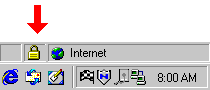
Small screenshot of an old Windows browser/status bar with a yellow padlock icon (secure connection) highlighted by a red arrow

The site address/URL will start with https://
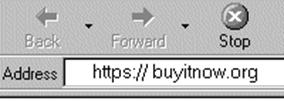
Grayscale browser toolbar with the address bar showing “https://buyitnow.org,” indicating an HTTPS connection.

When you go to transmit information there will be an indicator confirming the transaction is secure (a box which pops up).

Pop-up dialog titled “Security Alert” with an info padlock icon, stating: “You are about to view pages over a secure connection. Any information you exchange with this site cannot be viewed by anyone else on the Web.”