




- Homepage
- Make a Purchase
- How To Purchase From Airgas
How To Purchase From Airgas
Please be sure to check the Contracts section of this site FIRST before purchasing from Airgas. If you have questions, please email procurement@ufl.edu .
CONTACT INFORMATION
Louis Daigle
Airgas Store Manager
Ph: +1 (985) 507-3386
Airgas Store:
Ph: +1 (352) 338-7508
Fax: +1 (352) 338-2814

Rob Adams
Specialty Gas Specialist – South Region
Ph: (407) 849-0630 C (407) 725-3776
Steven McMillen
District Manager
Ph: +1 (352) 263-3289
ORDERING INSTRUCTIONS
- All Airgas orders should be placed through myUF Marketplace – please make sure you have your Airgas Ship To Customer Number handy to enter into the punchout search field. Please call the Airgas local office if you do not have your account number or cannot find it in the punchout.
- Select Switch Accounts to find your Ship To Account number

- Enter your Ship To account number starting with 000 and click Search
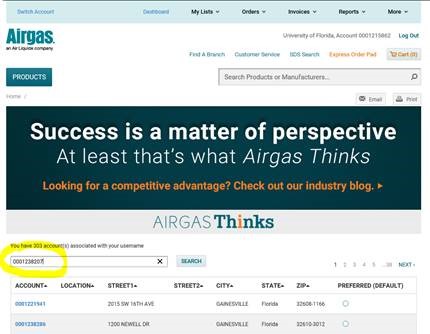
- Click the Preferred Default radio button and then Save Preferred Account button
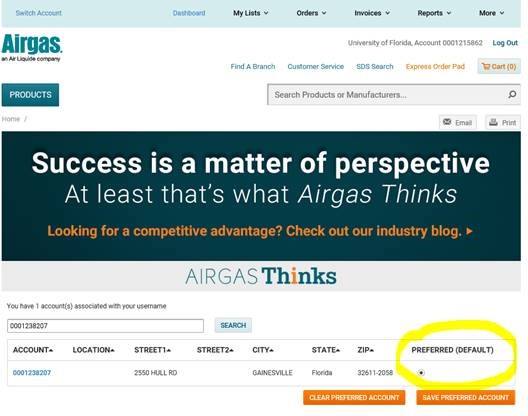
- It should now show in the top right corner of the punchout. Next time you log in, it should be there ready for you to shop. It will automatically be added to your myUF Marketplace cart.
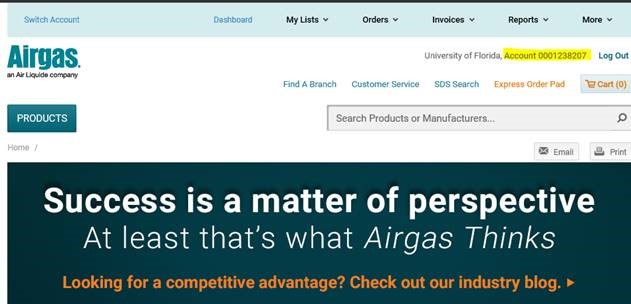
-
- Note the price of the gas includes a processing fee in lieu of monthly rental fees
- Once you have added items to your cart, click “Go To Cart” to review your order. Click “Checkout” to pull your cart into My UF Marketplace and complete your requisition. For instructions on how to complete your requisition, click here.
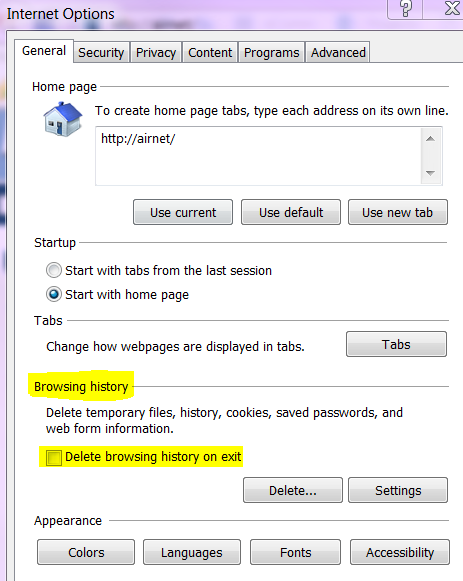
- Make sure you set your cache and cookies NOT to close upon exiting or you will lose your default Ship To number:
Watch a short video on Setting Your Ship To Account number as Default in the Airgas Punchout and Returning Cylinders.